
Suno is dead. I built my own music generator.
Suno is dead. I built my own music generator.
At least for me, Suno is dead. I don’t need the service anymore, because I built my own music generator. It runs entirely locally on my Mac. No subscription, no limit, no cloud.
The trigger
Suno recently cut downloads: twenty a month. Previously unlimited, now twenty. And you really have to hammer on that, because it’s outrageous. I’ve been paying for the service for months, and now, without me changing anything, the performance simply gets worse. Same price, less in return. For me it was clear: then I’ll just do it myself.
What I built
You probably know Suno: AI music from style tags and lyrics, in the cloud, with a subscription, and now with a download limit as well. I wanted to know: does this also work entirely at home? Without anything being sent anywhere, without a limit?
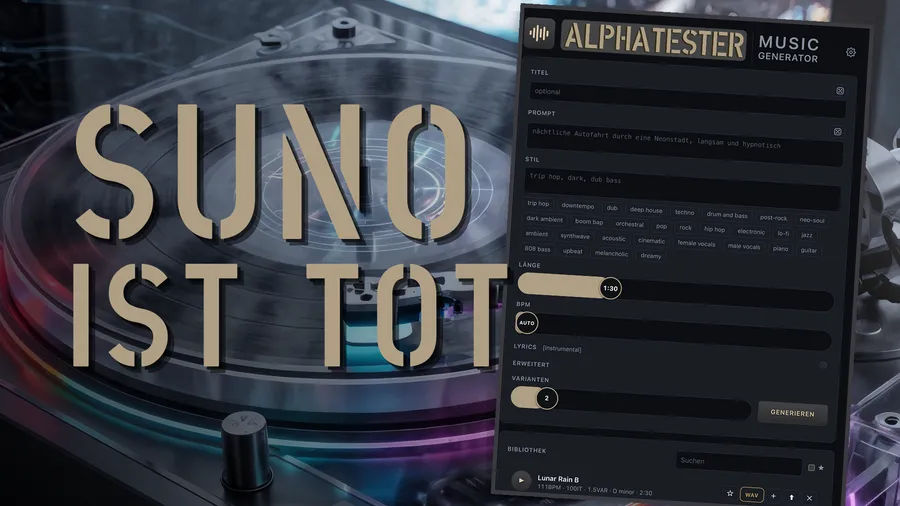
So I built my own web app, with an open AI called ACE-Step as the engine. The interface is my own, in the browser, running only on my computer. I enter style tags, for example “trip hop, dreamy, cinematic”, plus lyrics or simply “instrumental” – and off it goes.
Two models work behind it: a language model with 1.7 billion parameters that understands my text and plans the song, and a second model that actually synthesizes audio from it. Together that’s about eight gigabytes of models, downloaded once, and they never touch the internet again.
Try the interface yourself
This is the real user interface of my app, to try out right in the browser. Drag sliders, click dice, tap style chips – everything works. Only the GENERATE button is disabled, but two real songs from the app are already in the library for you to listen to.
Real songs are only generated by the app on your own computer – for that you need the GitHub repository below.
The app is now on GitHub, free and open source: github.com/agent-cue/music-generator. That way anyone can build their own music locally.
Never heard of GitHub? No problem.
GitHub is basically a huge online library for program code. People like me upload their projects there, for free, and anyone can download them. You don’t need an account and don’t have to install anything to have a first look at my project.
Here’s how to get the files, without any prior knowledge:
- Open the link above in your browser.
- Click the green button at the top right “Code”.
- Choose “Download ZIP”.
- Unzip the downloaded file somewhere, for example in your user folder.
Done, that’s the complete project folder. Everything else, i.e. installation and the first song, I explain step by step in the installation guide that comes with the project, understandable whatever your level of knowledge.
The trick with the chip
My Mac has an M4 chip with extra hardware for AI calculations. But: on this hardware the language model produces complete gibberish for me. That’s why the language model runs on the regular processor, which takes about twenty seconds, and only the music synthesis runs on the fast AI hardware.
I double-checked: the results of both are 95% similar, just faster. My rule of thumb: a song of a minute and a half takes about four minutes of computing time.
The extreme test: 50 instead of 20
And now the part I enjoyed most. I can queue up to fifty variations of a song at once. Fifty – not twenty a month, but fifty in one go. Let it compute overnight, listen through in the morning.
I tested what happens when I turn two knobs: how many computation steps the model takes, and how creative, i.e. how “hot”, it is allowed to be. Ten steps sound muddy, hardly any structure. Fifty steps are already decent. A hundred steps make hardly any difference to fifty, just more expensive. And for creativity: a low value sounds stiff and predictable, a high value quickly gets weird. The sweet spot was clearly in the middle for me.
Every single song, by the way, automatically saves style, lyrics, the random seed and all slider values. So I can reproduce any hit exactly.
Honestly: the conclusion
In my first tests it was clearly harder to get really high-quality music out of my local version. But not impossible. The ten euros a month I save on Suno I now simply invest in my own time. In return I can have fifty songs made at once and am not limited to twenty downloads a month. For me the deal is worth it.
Would you rather build your AI music locally yourself, even if it’s more work, or do you stay with the convenient cloud solution, download limit or not?
The detailed video will follow shortly – I’ll link it here as soon as it’s ready.