
🎬 DEHANCER – Analog film look for DaVinci Resolve?
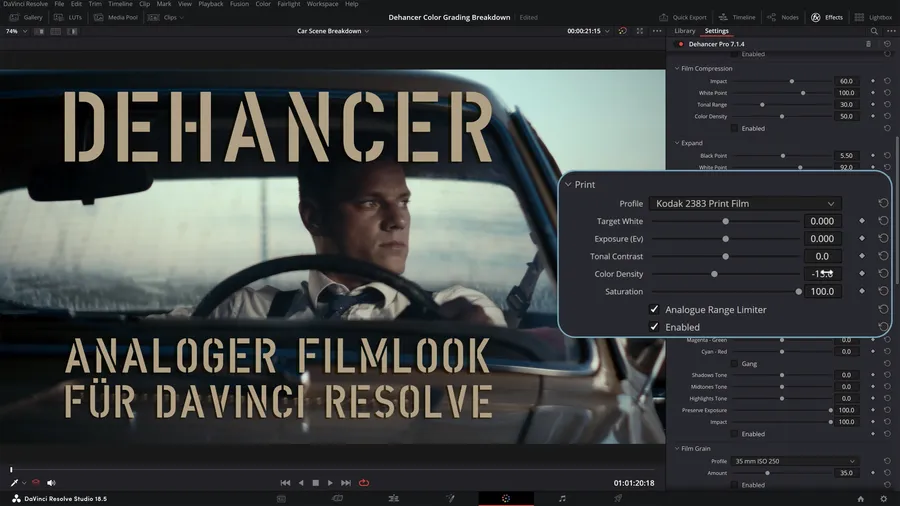
Today it’s about a plugin that many colorists celebrate – and that made me curious right away: Dehancer.
I came across it through a tip from my friend and colleague Dirk Hagen. Shortly afterwards I received a collaboration request directly from the team – and I was immediately interested. As always FULL DISCLOSURE – for my test I received a full license, which I’m also allowed to keep afterwards.
And if you go to DEHANCER.COM you get, https://www.dehancer.com/
with:
ALPHA10
a – how much will it be? Right!
10% discount on all products on the site.
Regardless of that, Dehancer simply triggered me.
Why? Because it’s not just another LUT pack – it’s a real emulation system of analog film. And I wanted to know: How real does it feel?
Today I’ll show you:
- the five most important effects
- the supported platforms
- the iOS app with a mini example
- and at the end: Which film look convinced you the most?
What is Dehancer?
Dehancer is not a filter plugin – it is a digital simulation of analog film processes.
Sounds like a marketing answer from ChatGPT – but there’s a system behind it.
Dehancer was developed by Pavel Kosenko , a passionate filmmaker and software developer with a deep connection to the analog film aesthetic and the craft aspects of film production. For him it was never just a question of the “look”, but a deeper appreciation of the history and the art form of film.
So we’re not just slapping a brightness filter onto our footage, but the plugin turns our footage into film material. And there are already over 60 real film profiles preinstalled. Effects like film grain, halation, bloom, vignette, film breath – we’ll look at those more closely in a moment. Plus advanced tools like Film Compression, Print Medium and CMY Color Head – all inspired by the real optical film workflow.
Platforms
Dehancer is now not a DaVinci-only tool. It also runs on Final Cut Pro, Premiere Pro and After Effects. For photo platforms there is a version for Lightroom, Photoshop, Capture One and Affinity Photo.

There is now also a 📱 mobile app: for iOS, for iPhone & iPad
Now let’s look at the top 5 Dehancer tools that stand out the most.
First up is the…
1. 🎞 Film Grain
Not simply laid over it – the entire look is reconstructed. The grain is based on the tonal value and color distribution in the image, which looks extremely real. You can set grain separately for shadows, midtones and highlights.
I’m personally not a big fan of film grain. To me it has always looked rather forced. But I’m happy to be convinced. The examples you see here look absolutely cool. And in combination with other effects I would use it too.
2. 🔥 Halation
The famous reddish glow around highlights – e.g. in backlit shots. Dehancer simulates the physical effect of light scattering in the emulsion. With Kodak Vision3, for example, you get this reddish glow.
3. 🌫 Bloom
Bloom creates a natural, soft light radiance. Not a glow filter – but a real physical model. Great for night shots and string lights.
4. 🧪 Film Compression
This tool reduces harsh digital clipping and brings back analog dynamics . Highlights are “rolled off” instead of cut off – with parametric control over White Point, Color Density and Tonal Range. One of my favorite effects. Because with it, areas of the image reappear that I had already written off. An effect isn’t always just an effect! As an editor it’s up to you what you get out of the footage you have. And if you use a supposed “film look” effect to reconstruct blown-out areas in your video – good for you!
I’ll cover the next effects under one point:
5. 🎬 Vignette + Gate Weave + Film Breath
These subtle movements and darkenings at the edges round off the analog look – especially in combination.
For my part, I love these vignettes. They automatically draw the eye more toward the center of the image. And when you start a new color correction with Dehancer, you should define the vignette first.
But what makes Dehancer so special?
- Physically correct: Not a filter, but real emulation based on actual films.
- Finely adjustable: Almost every effect has knobs and dials – for creative control.
- Cross-platform: Works in video, photo and mobile.
- Constantly expandable: Via tool profiles, camera matching, ACES support and print types like Kodak 2383.
Downsides?
- Performance-hungry: On weaker hardware it can stutter.
- Not cheap: The full version costs $449, but it’s lifetime.